I Got a Computer Vision Prototype Running in 2 hours using Claude Code & Cursor
I’m a non-technical founder. I didn’t write a single line of code. But it works (kinda).

Hey!
I’m Jay, founder and CEO of Casper Studios. We’re a bootstrapped AI services firm. We’ve worked with companies like Netflix, hedge funds like Ardmore, private equity firms, early-stage startups like Kit, and many others. We have a team of about 20, located across the world, mainly New York, Toronto, Miami, and the Philippines.
I wanted to share my own journey of how I’m experiencing coding agents, live. Over time, I think this newsletter will morph into general musings about AI, maybe some fun stuff I’m learning from our client work, whatever I think is most relevant.
Some of you are new to me. Others I’ve been writing to for years. For both, thanks for being a part of my journey.
This will be a little different than my LinkedIn posts. Longer-form. More room to expand on my thinking. Feel free to email back and let me know how I can shape this over time. If you want us to share the mini course our team is building on how to use Claude Code you can sign up for it here.
Let’s get into it.
I’m an AI founder who had never touched a coding agent. That felt hypocritical.
You would think that by running an AI services company, I’d already be deep in these tools. My intuition has been: let me stay busy with recruiting, sales, partnerships, all that stuff, while the experts on my team (i.e., our FDEs) actually use these tools to build products for our customers and ourselves.
It’s gotten to the point where the team has been moving and grooving on coding agents SO much that I had to take a look.
Just like the creator of Claude Code saying almost 100% of his code is now written by Claude Code, that’s how our team has experienced it too.

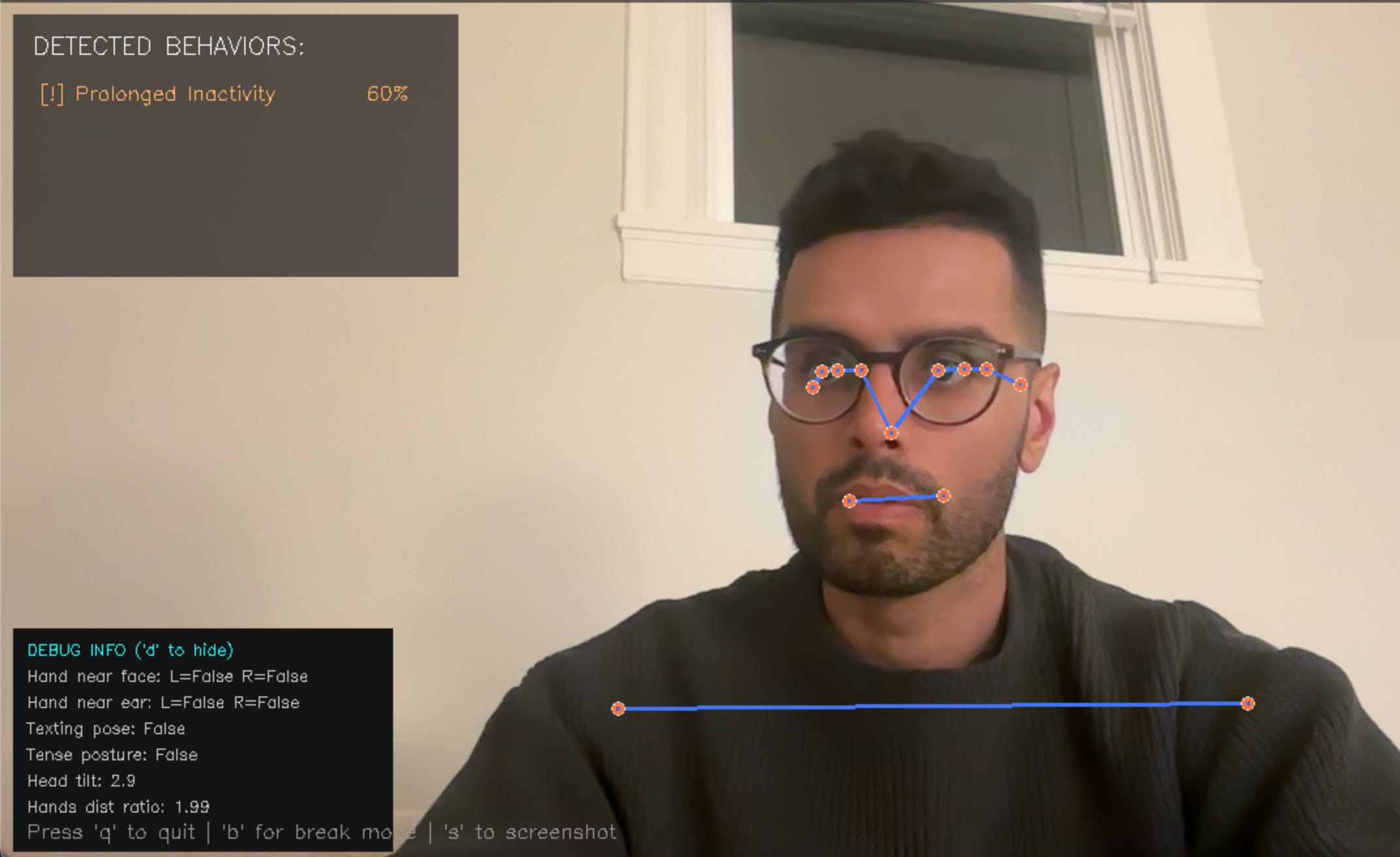
So I finally jumped in. And within about ~2 hours of set up and playing around had a working computer vision model running on my laptop, tracking specific behaviors through my webcam in real-time.
Here’s how that happened.
How We Think About These Coding Agents at Casper
My philosophy with my team on coding agents has been simple, even if I wasn’t following it myself lol.
Here’s a budget every month. Have fun. Go explore. Only ask is to share your learnings. Every day. All the time. Help our team get up to speed. Let that help our clients get up to speed too. Those learnings are compounding now at >10 engineers on our team.
It felt at first weird to give people that much freedom but I’m glad we did. I think more companies should be doing it.
What that’s done internally is give developers space to lean into all these tools. People have their own implementations. Some use Claude Code directly. Others use Claude Code within Cursor. Others use Windsurf.
And it’s working.
Last year we built a voice AI experience for Netflix and Doritos. 400,000 people called in. 75,000 left messages. It was built with coding agents by ~1.5 engineers over two months. Zero bugs in production. When you pair good engineers with these tools, the output is kind of absurd.
But as a non-technical person, I hear all these product names, I see their revenues going up like crazy, I hear our developers saying it’s amazing, I scroll Twitter and everyone’s talking about it, but I didn’t understand what using these products meant myself.
Even the people that helped create modern LLMs feel behind.

Getting Set Up
I sat down with our COO Derek for almost two hours this past week and he walked me through the entire experience. He’s non-technical too but dangerous with these coding agents.
The very first thing: there’s an intimidation factor with opening up a terminal. But honestly, there’s just a few quick things you need to know. I needed a Claude Pro subscription (if you’re already a Claude user, it’s the same Pro subscription). Then I needed to download Cursor.
I was always confused about why you’d use Cursor + Claude Code versus just using Claude Code directly.
The way I think about it now: Cursor is an interface that sits above all the models. It lets you leverage Claude Code, Gemini, OpenAI, whatever. A good comparison is Relay or Gumloop for workflow automation. Those platforms connect multiple models to build automations. Cursor is doing the same thing, just for coding.
Once I got that mental model, I had my Claude Code subscription, I had Cursor, and I was off and running.
Testing It On a Real Project
I wanted to see how much I could get ahead of a real client project by building a quick POC myself.
The project: implementing a computer vision model for a $100M+ company we’re working with. It’s a mix of traditional ML work and LLMs for some in-person use cases. I’d usually punt this over to an FDE to build a POC, but I wanted to work on it myself instead.
I uploaded our scope of work into Cursor, “called” Claude, and started working with it just like I would in ChatGPT or the Claude chat interface. At first I asked it to create a plan.
It’s almost like when you run a deep research query in ChatGPT. You set parameters. It asks clarifying questions. Then it goes off and does its job. Imagine that mental model but for any work you’re trying to do. Doesn’t have to be research. Could be building a product. Building an automation. Whatever.
Where It Got Real
The interaction was collaborative. It would run through scripts, check in with me, ask if I wanted it to install certain coding languages or libraries. Most of the time I’d just say “go for it” because I don’t know how to do that stuff anyway. It would find libraries, handle dependencies, do all these things.
Pre-AI, I would have stopped here. Me needing to learn how to find the right coding library, install the right infrastructure, no way; I would not have the capacity to learn all that. I’m too lazy for that kind of work. But with Cursor it just kept going. I kept hitting yes, approve, keep going, thanks!
Many moments threw me off.
I didn’t know how to use the product to make simple edits. Should I chat with it and ask questions on the right side pane? Should I do it in the terminal? Wait, apparently you can’t control all delete? There’s new commands here? I was creating something sophisticated, I could feel that, but I felt pretty dumb doing it.
Derek had to step in and explain what went wrong several times. Most of the time we just told Claude to try a different approach, and it course-corrected. Other times I would just ask the right side chat from Cursor to flip into agent mode to help me figure stuff out. SUPER simple things like “hey I can’t write in the terminal please get me back there”. For anyone reading this that knows how to use IDEs you’re hopefully laughing. It does speak to the barrier that many non technical folks do feel and will feel getting started.
It was a good reminder: you still need someone who can read the errors, even if you can’t fix them yourself. It is hard to just do this yourself w/o getting frustrated and giving up.
Was anything created?!
As we got started, one agent was running in parallel thinking through the business logic, what was the computer vision model tracking, what was it looking for. For those things I had more intuition and could guide it.
There were specific actions I wanted it to track. And when it built it, it literally built it in the interface, I said, “Can you open this up?” It asked for permission from my camera. It started working. And I was in the interface working with it.
I could test it, open the camera, iterate, close it, and it would debug and improve. I did this over the course of maybe 20 minutes. And by that point I was tracking most the specific behaviors I wanted.
So What?
I’m energized by this experience. I feel like I’m in more control. I’m not Cursor-pilled or Claude Code-pilled yet. But I’m excited to run more projects and keep tinkering.
This is exactly what I tell our clients: you don’t need to become a developer. But you should understand what’s possible well enough to have an opinion. To know when something should take two weeks versus two days. To prototype your own ideas before handing them off.
Now I can do that myself. Kind of. I still have more to go. And it feels way more real than just spinning things up in Lovable.
If you’ve been hesitant to jump in, the intimidation factor is way higher than the actual learning curve. Block three hours this week. Download Cursor. Implement Claude Pick a small project you’ve been meaning to explore. See what happens.
And if you want help getting started, reply to this email. Happy to point you in the right direction.